

July 18, 2016
Macstock 2016
Here is a Flickr album of my Adventures at Macstock 2016 and of touring downtown Chicago. My feet have *almost* forgiven me. I'll write more about this wonderful experience soon, so stay tuned!
July 12, 2016
FMEO - Episode 340 with Dave Ginsburg

Mike Potter was in Crazy Headless Chicken Mode while prepping for #Macstock2016, so he invited me to help Dave Ginsburg with the show in his absence. He must think we know how to podcast, or somethin! Tap or click the play button in this player to listen to the show.
Check out Mike's show notes here: http://www.formaceyesonly.com/2016/07/11/for-mac-eyes-only-and-the-mice-will-play/

June 29, 2016
That Time I Made Bart Laugh and Choke On His Beer
 I have been friends with Bart Busschots for a long time now. I love to make him laugh and I've been wanting this very moment for a long, long time and it has finally arrived...at 56 minutes and 24 seconds in to this video podcast I contributed to for British Tech Network.
 |
| video: http://www.britishtechnetwork.com/wp-content/uploads/2016/06/BIG_270616.m4v |
Check out original show notes here: http://www.britishtechnetwork.com/big/molten-salt-is-my-new-safe-word
Thanks to Ewen Rankin for inviting me on the The Big Show with Jeff Gamet, Paul Wright, Chris Campion, and Bart Busschots who allow me to not behave myself.
explicit
Tap or click the play button in this player to view the show.
Maybe I enjoy it just a little too much?

June 13, 2016
WWDC 2016 Reactions With Mike & Dave On The For Mac Eyes Only Podcast
Mike Potter graciously invited me on his show with Dave Ginsburg to discuss WWDC 2016 announcements live. It was a really fun discussion and I had a great time. I felt like a golf announcer at certain moments! There was lots to see and talk about during the keynote. I may gotten just a little too excited about new emoji. Tap or click the play button in this player to listen to the show.
Check out Mike's show notes here: http://www.formaceyesonly.com/2016/06/13/for-mac-eyes-only-reaction-time-apples-wwdc-2016-keynote/
Click Podcast Audio Link to For Mac Eyes Only Show Number 339 to listen to the audio podcast and consider subscribing to the show.
June 5, 2016
Encouragement
This is beautiful to me and I wanted to share it here.

original link: https://media.giphy.com/media/l396JXjKtDsgQSbjG/giphy.gif
I'd also like to wish a very
Happy 10th Birthday
to my Nephew, Christian!
Ten years, already! It seems like just yesterday when your Mom and I were comparing bellies on a Skype video call. We were so excited for your arrival! Love ya, buddy!


May 13, 2016
On MacVoices Talking About The Road to Macstock with Chuck Joiner and Jodi Spangler
Chuck Joiner interviewed Jodi Spangler and I about our upcoming presentation called Senior Moments at Macstock 2016.
Here is the original link and I hope you will subscribe to Chuck's MacVoices podcast: http://www.macvoices.com/macvoices-16123-road-macstock-jodi-spangler-melissa-davis/
YouTube Link
Please consider joining us in July at Macstock. It will be so much fun!
Visit macstockconferenceandexpo.com to learn more.

Here is the original link and I hope you will subscribe to Chuck's MacVoices podcast: http://www.macvoices.com/macvoices-16123-road-macstock-jodi-spangler-melissa-davis/
YouTube Link
Please consider joining us in July at Macstock. It will be so much fun!
Visit macstockconferenceandexpo.com to learn more.

April 20, 2016
Geekiest Show Ever with Kevin & Mike - Episode 209

Talking smack with Kevin and Mike on
"Geekiest Show Ever 209 – Peanuts Cause Facebook Problems"
Check out original show notes here: https://geekiestshowever.wordpress.com/2016/04/20/geekiest-show-ever-209-peanuts-cause-facebook-problems/
explicit
Tap or click the play button in this player to listen to the show.
explicit
Tap or click the play button in this player to listen to the show.
I'm Speaking at Macstock!
Look! They even put me on their website! Go check out the speakers page here: http://macstockconferenceandexpo.com scroll down to see the list of all the awesome people I'll be sharing a stage with at the conference. I'm really looking forward to seeing my friends and I hope you can join us!

March 18, 2016
Upgrade Your Car With ZUS

ZUS to the rescue! Thanks to a review unit from nonda.co, this handy new gadget has given my 13-year-old car a bit of an upgrade. ZUS plugs into the cigarette lighter port and converts it into a 2-port charging outlet for USB-powered devices. I love how each port is illuminated so I can find them easily in the dark. It's also built with military-grade materials so I don't have to worry about it melting or malfunctioning in the desert temperatures where I live. Not only does this thing charge our smartphones AND tablets quickly, it also helps me locate my car!
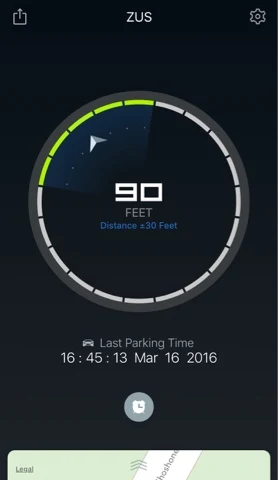 Imagine you're on a road trip with the family and your destination is an amusement park with one of those huge parking lots. I always have so much anxiety worrying about finding my car when we get back. Recently, I took the kids to the Children's Museum downtown where parking was a huge challenge because of the need to park so far from our destination. In these scenarios, I used to whip out the Notes app and jot down the row number or some kind of description or snap a photo – all while trying to keep my wiggly kids from having a meltdown because it's taking Mommy too long. Now I can park my car quickly and worry-free because ZUS will help me find it. When it's time to walk back, my kids love helping me find our car with the ZUS iPhone app because it gives us a compass to follow. If for any reason it can't pinpoint your location as you park your car, the app lets you know and directs you to snap a photo of the area surrounding your car. (So far in testing it out, it's only happened once during our current road trip.)
 Imagine you're on a road trip with the family and your destination is an amusement park with one of those huge parking lots. I always have so much anxiety worrying about finding my car when we get back. Recently, I took the kids to the Children's Museum downtown where parking was a huge challenge because of the need to park so far from our destination. In these scenarios, I used to whip out the Notes app and jot down the row number or some kind of description or snap a photo – all while trying to keep my wiggly kids from having a meltdown because it's taking Mommy too long. Now I can park my car quickly and worry-free because ZUS will help me find it. When it's time to walk back, my kids love helping me find our car with the ZUS iPhone app because it gives us a compass to follow. If for any reason it can't pinpoint your location as you park your car, the app lets you know and directs you to snap a photo of the area surrounding your car. (So far in testing it out, it's only happened once during our current road trip.)
Another great feature in the ZUS app is the ability to set a parking timer right there as soon as you park. We've definitely been in that situation many times where we had to concern ourselves with a parking meter ON TOP OFF trying to remember at which meter we've parked! Two problems solved with one ZUS!

My family and I have travelled across the country and back several times and I can already see how handy ZUS will be for future road trips to come.
I really think this would make a fantastic gift for Mother's Day on Sunday, May 8th, 2016. When you buy a ZUS directly from nonda.co, use this 10% off promo code (valid until March 31, 2016)
SMM-AKZUSSUMMER16
If you're reading this after Mother's Day, then Father's Day next on the gift list! Check it out using my affiliate link and thanks in advance for supporting my blog!
Many thanks to nonda.co for the opportunity to review ZUS for my readers!
SMM-AKZUSSUMMER16
If you're reading this after Mother's Day, then Father's Day next on the gift list! Check it out using my affiliate link and thanks in advance for supporting my blog!
Many thanks to nonda.co for the opportunity to review ZUS for my readers!
March 8, 2016
High-Tech Parenting With Kevin & Mike On Geekiest Show Ever Episode 204
Talking tech with Kevin and Mike on
"Geekiest Show Ever 204 – High-Tech Parenting"
Check out original show notes here: https://geekiestshowever.wordpress.com/2016/03/08/geekiest-show-ever-204-high-tech-parenting/
explicit
Tap or click the play button in this player to listen to the show.
explicit
Tap or click the play button in this player to listen to the show.
February 25, 2016
Girl Day

December 8, 2015
Guy Lets Me Vent On MyMac Podcast Episode 584-5

"MyMac Podcast 584-5: TheMacMommy is Angry"
Check out original show notes here: http://www.mymac.com/2015/12/mymac-podcast-584-5-themacmommy-is-angry/
Tap or click the play button in this player to listen to the show.
Tap or click the play button in this player to listen to the show.
September 20, 2015
Reader View for Safari in iOS 9 Has New Tools
Whenever you visit a webpage on your iPhone or other iOS device using Safari, check the url or address bar for the "Reader View Available" message that will show briefly. You can then tap the icon in the upper left corner to enable Reader Mode. This will strip the site down to just text and images and remove most ads and other details of a website that distract from reading the text of the article. Once you're using Reader Mode, tap the "aA" icon in the upper right. New in iOS 9, you can now change the text size, typeface, and background. Pretty nifty!
Here's a GIF showing the steps.

Here's a GIF showing the steps.

September 13, 2015
Adorable Little App Review: Find Adventure, Alfie Atkins

I was amazed to check the progress my son was making as he earned new color dabs and bonus patterns. It's just a cool, entertaining app that reduces stress and gets imaginations going!
My only concern is the large footprint it takes up on our iPad. It's always up there at the top of the usage list. It would be great if the app developers found a way to reduce the size the files take up. Other than that, we love it and my son wouldn't dare delete it to save room! If you have room on your iPhone or iPad, I recommend it. Play it with your child and they will love showing you how to color the creations you can make together. You may find yourself playing it by yourself sometime just to relax!
Here is a link to the App Store where you can download it or put it on your Wish List for later. It would be a cool gift for a friend.
Thanks to the App Developers over at GroPlay for giving me this promo to review for you. They have some other amazing apps you should definitely check out!
June 2, 2015
How To Update Adobe Flash Player: A Walk-Through
Hand-Made Mac Tip:
How To Update Adobe Flash Player On A Mac — A Walk-Throughwith Step By Step Pictures
I get many requests for how to do this, so I thought I'd make a tutorial.
I hope this is helpful and helps keep you SAFE from hackers!
So, you're surfing along on the Internet in Safari or whichever browser you choose and all of the sudden, this window pops up out of nowhere! It seems to do this fairly frequently!
Why? Because Adobe is constantly patching its software to keep the bad guys out and they need to send you an update. While you don't want to ignore these updates, you don't want to get tricked into putting something harmful on your computer by the bad guys pretending to be Adobe either.
Follow these steps to do it the safe way:
Here is the window that pops up. Even though this one may be legit, lets pretend it's not and go get it from the source making sure we are the one making all the calls.


 |
| You may have to repeat these steps if BOTH of these plugins have updates. Most times it's just one or the other. You will see a message that says you're up to date if none is needed. If an update is available, it will say so like shown in the next image. |


Wow. 14 steps! They sure don't make it simple, do they Why do we even need Adobe Flash anyway?
It's one of those necessary evils that's called a plugin. It's like a supplement for our computers. Without it, we wouldn't be able to process certain multimedia content like videos or interactive graphs. Lots of banking websites still require it to make their websites function the way they were designed to be viewed by the visitor. They want to display information in a chart and it may have some type of animation. To you it may be overkill, but to the web designers, this is the choice they made.
What if I don't care about updating it? Can't I just skip it?
Sure, but you do so at your own risk. You could be allowing the plugin you are currently using to operate with a "hole" in it — one the bad guys could get through to compromise your security. Better safe than sorry.
April 22, 2015
Is Your Website Mobile-Friendly?
Google has a new tool to check your website to see if it is mobile-friendly. Just click the link and enter your site"s url into the box and view the results.


This example shows that my blog is mobile-friendly.
What happens if your site isn"t mobile-friendly? Your site won"t get listed at the top in google search results which means less visitors. Contact your website designer and let them know. If you need a website designer, let me know and I can put you in touch with my friends and colleagues in the business.
April 18, 2015
Add A New Chrome Search Widget
Hey there Information Junkies, this one's for you!
Got Chrome installed on your iPhone?
(if not tap on this App Store icon to install first)
Swipe down from the top of your iPhone screen to reveal the Today View and Notifications. Now you can add a handy-dandy search tool using the Chrome widget where you can either type or speak your query!
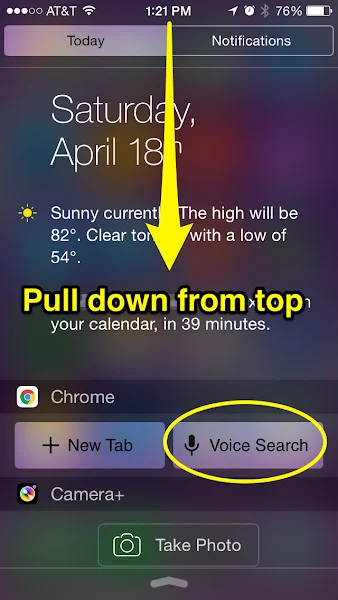
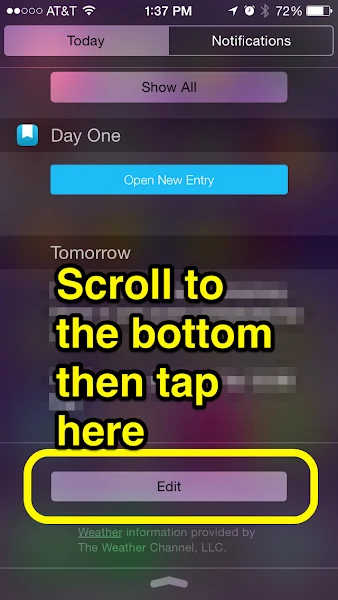
Here's how to get it to show up there:
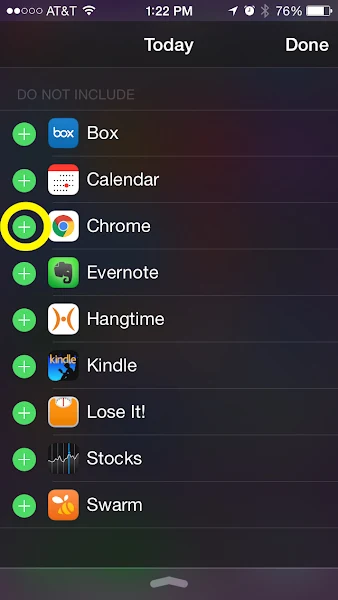
Look for Chrome in the list then tap the "+" to add it to your widgets. Long-press then push with your finger to rearrange the order in which they appear when you pull down in the Today View.
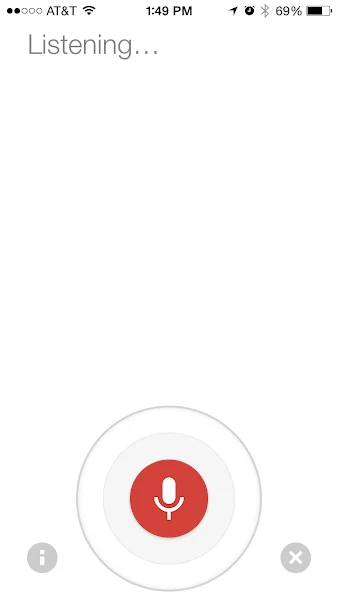
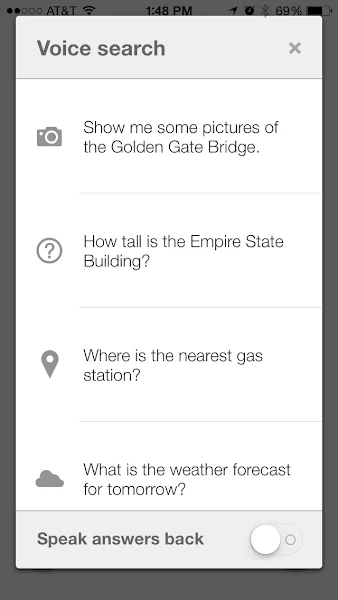
When you tap the Voice Search button, it's initially configured to speak the results. If you want to turn off the audio, tap the little "i" icon for more information.
Look to the bottom to slide off "Speak answers back"
If you don't have the Chrome app, get it here:

Happy Searching!

Got Chrome installed on your iPhone?
(if not tap on this App Store icon to install first)
Swipe down from the top of your iPhone screen to reveal the Today View and Notifications. Now you can add a handy-dandy search tool using the Chrome widget where you can either type or speak your query!

Here's how to get it to show up there:

Look for Chrome in the list then tap the "+" to add it to your widgets. Long-press then push with your finger to rearrange the order in which they appear when you pull down in the Today View.

When you tap the Voice Search button, it's initially configured to speak the results. If you want to turn off the audio, tap the little "i" icon for more information.

Look to the bottom to slide off "Speak answers back"

If you don't have the Chrome app, get it here:

Happy Searching!

April 17, 2015
Ditch Annoying Ads In Safari on iPhone

Did you ever go to read an article on a website using your iPhone only to feel completely frustrated when an advertisement hijacks your screen and takes you somewhere else because you accidentally tapped an ad while scrolling?
Don't put up with that! Use Reader View!
Not all sites support it and if they don't, shame on them! When a site supports Reader View, it will briefly display it in the same place where the URL or website address appears before returning back to the website name. If you miss it, don't worry, just look for the little icon located in the far left of that website address field. It will look like the symbol for a paragraph.
Subscribe to:
Posts (Atom)