February 26, 2024

Live Life Use Passkeys

On episode 413 of Geekiest Show Ever, Elisa and Melissa discuss the answer to life, the universe, and how it could be passkeys. We have helpful links in our full show notes. Do you have questions about what you heard in this episode? Please send us your feedback. Follow us on Mastodon for additional tips and conversation. We’d like to hear from you, so let us know which tech topics interest you most. Find Melissa here and find Elisa here or here. Geekiest Show Ever is an independent publication and has not been authorized, sponsored, or otherwise approved by Apple Inc. Products made by Apple mentioned in this podcast are a trademark of Apple Inc., registered in the U.S. and other countries and regions. Episode artwork by Melissa Davis. The passkey icon is a trademark of FIDO Alliance, Inc.

Passkey Directory – FIDO Alliance

Passkeys.directory – 1Password

Unlock 1Password with a passkey (beta)

Melissa’s Passkeys presentation for Tucson Macintosh Users Group

February 21, 2024

Passkeys Presentation for TMUG


My Passkeys presentation for TMUG (Tucson Macintosh Users Group) begins at the 49:12 mark.
This was the first time I gave this presentation. I plan to polish it up and post more about it again later.


References

  1. What is a Passkey? Demo — passkey.org by Yubico
  2. What is a Passkey? Demo —passkeys.io by Hanko
  3. Passage Register — 1Password
  4. Passkeys.directory — 1Password
  5. FIDO Alliance Passkey Directory
  6. Keeper Security supports passkeys for effortless authentication
  7. Make your passkeys and passwords available on all your devices with iPhone and iCloud Keychain — Apple
  8. February 16, 2024 Authenticate 2023: The role of credential managers in the past, present, and future of authentication with Anna Pobletts – FIDO Alliance
  9. February 13, 2024 Passkeys might really kill passwords with Anna Pobletts of 1Password — The Verge
  10. February 8, 2024 I Stopped Using Passwords. It’s Great—and a Total Mess by Matt Burgess – Wired
  11. January 16, 2024 How to save, share, and manage passkeys using 1Password by Nick Summers — 1Password
  12. December 29, 2023 A Passwordless Future Passkeys with Anna Pobletts of 1Password — Syntax
  13. December 20, 2023 Passwords vs. Passkeys - FIDO Bites Back! with Jeff Crume — IBM Technology
  14. November 20, 2023 FIDO Promises a Life Without Passwords with Jeff Crume — IBM Technology
  15. November 4, 2023 Passkeys Email to Friends and Family by Allison Sheridan — Nosillacast
  16. August 22, 2023 About the security of passkeys – Apple
  17. May 24, 2023 Should You Use Passkeys Instead of Passwords? by Amira Dhalla, Yael Grauer — Consumer Reports
  18. May 12, 2023 Passkeys may not be for you, but they are safe and easy—here’s why by Dan Goodin – Ars Technica
  19. December 2, 2022 About Passkey — Know A Little More with Tom Merritt
  20. November 16, 2022 Seven Misunderstandings About Passkeys by Nick Hodges — Passage by 1Password
  21. May 14, 2022 CCATP #728 —Bart Busschots on Why FIDO Passkeys Rock by Bart Busschots — Chit Chat Across the Pond
  22. February 28, 2016 Introduction to the Technical Debt Concept by Declan Whelan, Jean-Louis Letouzey — Agile Alliance
  23. Unlock 1Password with a passkey (beta) — 1Password

February 11, 2024

Mail Mayhem

On episode 412 of Geekiest Show Ever, Melissa tells Elisa the story about how she had to rescue her Mac from the evil Apple Mail app. If your Mail client ever behaves badly, you might want to check this out. You can find our full show notes here. Do you have questions about what you heard in this episode? Please send us your feedback. Follow us on Mastodon for additional tips and conversation. We’d like to hear from you, so let us know which tech topics interest you most. Find Melissa here and find Elisa here or here. Episode art by Melissa Davis.

January 28, 2024

Goonies Never Say Die


On episode 411 of Geekiest Show Ever, Elisa and Melissa discuss tech for getting organized with finances, food, and, genealogy. Check out full show notes here. Do you have questions about what you heard in this episode? Please send us your feedback. Follow us on Mastodon for additional tips and conversation. We’d like to hear from you, so let us know which tech topics interest you most. Find Melissa here and find Elisa here or here. Episode art by Melissa Davis. 

We talked about using Paprika by Hindsight Labs LLC, MacFamilyTree 10 by Synium Software, and Money by Jumsoft.


Paprika app icon MacFamilyTree app icon Money app icon


January 14, 2024

Enlightened

On episode 410 of Geekiest Show Ever Elisa and Melissa discuss how they used tech to entertain over the holidays along with their favorite new flameless candles. Check out full show notes here. Do you have questions about what you heard in this episode? Please send us your feedback. Follow us on Mastodon for additional tips and conversation. We’d like to hear from you, so let us know which tech topics interest you most. Find Melissa here and find Elisa here or here. Episode art by Melissa Davis.


SketchParty TV

Use FaceTime on Apple TV 4K (2nd generation or later)

Auto Tracking Phone Holder

How Screen Time Can Save You When Your iPhone Is Stolen – Lifehacker

3 in 1 Charging Station for Apple Devices 20W Foldable Mag-Safe Charger for Travel Wireless Charger Pad

Eldnacele Flameless Candles Pillar Flickering Dancing Flame Battery Operated LED Candles

Homemory 400+ Hours 6 Pack Flameless LED Votive Candles with Timer

DRomance Flameless Taper Candles with Remote and Timer, 2 Pack Red Moving Wick LED Flickering Taper Candles

Nimiko Flameless Candles with Remote, Battery Operated Flickering Flameless Candles

December 17, 2023

Geekiest Gift Guide

On episode 409 of Geekiest Show Ever Elisa and Melissa share their favorite and most geekiest gift ideas. Check out full show notes here. Do you have questions about what you heard in this episode? Please send us your feedback. Follow us on Mastodon for additional tips and conversation. We’d like to hear from you, so let us know which tech topics interest you most. Find Melissa here and find Elisa here or here. Episode art is a photo by KoolShooters on Pexels.

June 30, 2021

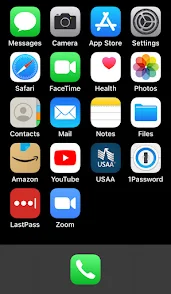
Setting up iPhone for Vintage Users in a Dignified Way

basic iPhone home screen
I was a guest on Allison Sheridan's Chit Chat Across the Pond where we had a great discussion about how to help inexperienced smartphone users of an advanced age group by setting up a new iPhone for them or optimizing the one they already have.

I hope you enjoy listening to the show as much as I did helping to make it. Allison and I could talk for days on this subject and I think you'll be able to tell. :)


Here are the show notes I composed for this episode. It's super long and I've modified it to add some new tips I thought of after the recording, but I hope it can be used as a reference guide for those who might be struggling or need some additional tips when working with their loved ones or assisting a friend in need.

Alternative HTML5 Audio Player

Problem to be Solved: simplifying a complicated device to meet the basic needs of a user with limited touch interface skills while helping to preserve their autonomy in the process.

Recurring things I have observed to be helpful
If it causes more problems than it solves, it’s time to reevaluate.

This is not a complete list and it can take days or even weeks of tweaking, exploring, and experimenting to get someone’s device set up to be the most optimal for their needs, but it’s a good place to start thinking about the most necessary features and settings. Start by doing the initial setup and then make adjustments as the person you're helping gains more confidence and experience. If there is something they don’t like, take time to listen to their needs.

In the beginning it can be really hard for them to ask for help when they don’t know what something is called in order to phrase the question effectively. Aim to reduce whatever is causing friction by asking them what task they’re trying to accomplish. Maybe the text is too small or the screen doesn’t stay lit long enough for them to finish their question, but they weren’t sure how to convey that to you. 

Always check and ask for consent as you go. They might not understand what it is they are consenting to though, so try to explain your intent to help them be more secure with their new device and how the setup is intended to help them use it more easily and securely. Trust is paramount and they’re relying on you to help.

June 9, 2021

WWDC2021 Reactions

On Geekiest Show Ever episode 359, we cherry-pick our favorites from the slew of new software features that were announced at WWDC2021. It was held virtually on Monday, June 7, 2021. (I posted the original show notes here: https://www.geekiestshowever.com/gse359-wwdc2021-reactions/) Do you have questions about what you heard in this episode? Please send us your feedback. You can email us: podcast at geekiestshowever dot com. Follow us on Twitter for additional tips and conversation: https://twitter.com/GeekiestShow. We'd like to hear from you, so let us know which tech topics interest you most. Elisa can be found at https://twitter.com/senseidai/. Episode artwork credit: @DylanMcD8 on twitter Link to episode artwork credit: @DylanMcD8 on twitter

Here are Apple's links to more details about all the features that were announced:

iOS 15

iOS 15 Overview

Full list of new features available with iOS 15


iPadOS

iPad OS Overview

Full list of new features available with iPadOS


macOS Monterey

macOS 12 Overview

Full list of new features available with macOS Monterey


watchOS 8

watchOS 8 Overview

Conversation Boost is a feature I am really excited to try.
Check out this article from ai about it: Apple enhances AirPods with Conversation Boost, Find My integration, Spatial Audio for Apple TV — appleinsider

Check the Apple Security Updates page to see if your Apple gear is up to date.

Audio Link

May 31, 2021

Brett Terpstra on GSE358

On episode 358 of Geekiest Show Ever, we got to nerd out with Brett Terpstra! We talk music, machine setups, coding, apps, user experience, accessibility, super power productivity, ADHD, mental health, and more! I posted the original show notes here.


Brett's Links

https://brettterpstra.com
https://twitter.com/ttscoff
Look for ttscoff everywhere else :)
https://bunchapp.co
https://brettterpstra.com/projects/keybindings/
nvUltra

A Few of Brett's Favorite Mac Tools

BetterTouchTool: https://folivora.ai
Hazel: https://www.noodlesoft.com
CleanShot: https://cleanshot.com
Paletro: https://appmakes.io/paletro
Setapp: https://setapp.com
(affiliate link)

May 3, 2021

Knock on Wood

On episode 356 of Geekiest Show Ever, we talk to Bob Wood of ThinkBob.com. Bob is also President of the Tucson Macintosh Users Group of which Melissa is a member. We discuss the value of user groups and how you can join or support one near you — or — not so near you since many are now online for virtual attendance.

Bob's Links

Bob's Notes

Mac User Groups

  • Apple Podcasters and pundits should become members of their local MUGs and volunteer to give presentations a couple times per year.
  • This would provide them with more listeners and readers, strengthen the Apple Community, and perhaps add to their advertising base.

Apple CarPlay

  • Easy and safe way to be more productive
  • Listen to podcasts instead of music (learn stuff)
  • Send and receive phone calls and texts
  • Bluetooth Apple CarPlay is not needed, wired is better
Check the Apple Security Updates page to see if your Apple gear is up to date.

Do you have questions about what you heard in this episode? Please send us your feedback. You can email us: podcast at geekiestshowever dot com. Follow us on Twitter for additional tips and conversation: https://twitter.com/GeekiestShow. We'd like to hear from you, so let us know which tech topics interest you most. Artwork for this episode is by Bob Wood. Elisa can be found at https://twitter.com/senseidai

April 23, 2021

Check Your Cleaning Products

Lots of cleaning wipes on the market say they kill viruses and bacteria on contact, but what about SARS-COV-2 specifically? When they say, "on contact" what does that really mean?

Here are some examples and how you can check your own products online.
Click this link to use the EPA's List N Tool: COVID-19 Disinfectants where you can type in the EPA Registration Number found on the package label of your cleaning product. It will most likely be in tiny print, so have your magnifying lens ready!

April 19, 2021

Apple Fitness Plus Review

If you're thinking about trying a new fitness program, you won't want to miss the well-rounded, multi-perspective review on episode 355 of Geekiest Show Ever! We discuss Elisa's Apple Fitness Plus experience. Listener Scott shares his thoughts, too. Melissa has a tip for redeeming Apple Gift Card codes. 


Alternative HTML5 Audio Player


Listener Feedback & Recommendations

Scott recommends a book called "Hackers: Heroes of the Computer Revolution - 25th Anniversary Edition"
 

Apple Gift Cards

When you've been gifted an Apple Gift Card in a digital format like an email from a friend or from a third party like the one Apple uses for its Trade-In program, follow the instructions found on Apple's Help Topic page: Redeem your Apple Gift Card. In the case of Apple's current Trade-In processor, Phobio, they email you a "PIN" which a series of numbers containing spaces. Simply copy this "PIN" to a new note in your Notes app then delete the spaces between the numbers. Copy the modified "PIN" number into the text field where you're redeeming the code and the "Redeem" button text will now be accessible.

March 22, 2021

Home Smart Home

On episode 353 of Geekiest Show Ever, we discuss how we’ve been hacking our way through this pandemic. Elisa and I discuss the merits of using the word ‘hacker’ to describe someone who does something good with technology superpowers. Here is an article written by Chris Williams of The Register that examines the etymology in depth and where it might end up in our lexicons: So it appears some of you really don't want us to use the word 'hacker' when we really mean 'criminal''
HTML5 Audio Player


Terrible UI Prize Goes to Vaccine Registration Sites
COVID-19 Vaccine appointment scheduling has been frustrating to say the least, but we are finally starting to feel like we’re making some progress. Elisa has flexed her online ticket-ordering muscles and now has appointments down and underway! I finally managed to get an appointment for one family member and now I must wait my turn.

February 22, 2021

Locked Down

Hacking and scamming incidents are on the rise. It’s a sad fact of pandemic life now, but on episode 351 of Geekiest Show Ever, we’re here to tell you that you can take back some control if you know what to look out for and how to implement best practices. We will give it to you straight because we believe that online security should be a regular part of our overall well-being. It’s why we so frequently discuss security issues and using password managers. Tune in to hear us share our field experience for ways to help your loved ones become safer in our digitally connected world.


Photo by Danielle MacInnes on Unsplash
⏯Audio file is here: http://www.mymac.com/podcast/GSE/GSE351.mp3 🎧

🦉Follow us for even more helpful information: 

January 25, 2021

This Means Something

Did you ever have one of those flashbacks where you think you remember something that happened, but then you're no longer sure if it really happened or not? I have this memory from Kindergarten and now I'm not sure if it actually happened or if it's just a dream I remember. Either way, it's a super cute story even if it's not true.

Mrs. Trowbridge's Kindergarten class, 1979

I was wearing one of my favorite shirts. My hair was in two long pigtail braids. My shirt had a print on it that resembled lined notebook paper. Printed on the shirt was a recipe for chocolate chip cookies. Mrs. Trowbridge asked me to volunteer in the front of the class and we proceeded to follow the instructions on my shirt, put the ingredients together, and then bake cookies for the whole class. I was a human recipe book. I remember feeling very special that day, like I was a big helper. I think it was a lesson about following instructions — something very important for kids to do.

I don't know if this happened or not, but I have been able to recall this story for some time. It's the kind of story I'll probably still know how to tell when I have dementia. So, to whoever my future handlers are, I'm sorry if I tell you this story over and over, but please have fun with it and bake some cookies for yourself!

Muddy Waters

I drove in the RAIN today! I can't remember the last time I did that. The reason for leaving the house was to see my neurologist today. I can't wait to get more answers soon.

When I got home, Keagan greeted me like a little gentleman and said, "Your umbrella awaits." Then he escorted me through the back gate. He was so sweet and I thanked him. As I looked down, I noticed he was barefoot and his feet were caked in mud. He cracks me up because he LOVES to play in the dirt! Not that he needed an excuse to get muddy, but this was certainly one of his more creative ways of doing so.

In other news, I received the exchange parts for my AirPods Pro. They're almost perfect and I'm glad I could get replacement parts so quickly during a pandemic.

January 10, 2021

Shortcuts with Scott

Have you ever wanted a quicker or more automated way to do something with your iPhone? That would be a job for shortcuts and we found just the right geek to tell us all about them! On episode 348 of Geekiest Show Ever, Scott Willsey educates us on iOS Shortcuts: what they are, how they work, and why you might like to learn how to use them to craft your own.


Alternative HTML5 Audio Player

  
Graphic by Melissa Davis
 
Follow us for additional tips and conversation on Twitter @GeekiestShow.

Apple's Shortcuts User Guide Data Jar is an app for storing shortcuts.

Here is a link to the Reminders Backup example shortcut Scott made for us to follow along: https://www.icloud.com/shortcuts/158c4d1995ed4f9a9965853f8b9eb743

 
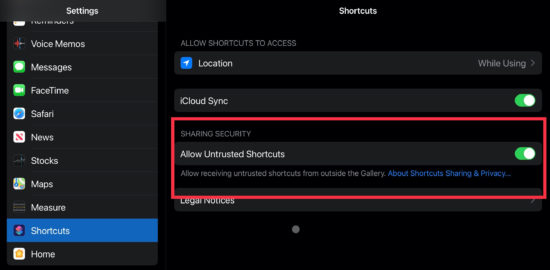
Use these settings to allow your device to work with shared shortcuts.

Learn more about Scott Willsey and check out where he podcasts over on BubbleSort Show.

Check the Apple Security Updates page to see if your Apple gear is up to date.

August 18, 2020

Uncomfortable, but Do-able is My New Mantra

Passwords for kids — this has been one area where I’ve had to compromise & it’s been uncomfortable, but do-able. It’s part of my job to teach cyber security to people, yet schools insist —and subsist— on using terrible passwords, but I get it. I don’t like it and I don’t agree with it, but I get it and I accept it even though I’ve worked very hard to teach my family the value of digital security and password hygiene.

When they have to use a site or platform that doesn’t allow for password changes, I remind them that it’s not how we do things, but for the type of educational service and limitations, we can compromise.

My kids have been using a password manager app since they were very little. But when it comes to using school laptops where personal apps can’t be installed, and for when they were too young to have their own smartphone to use as a look-up tool, we devised a plan. 

Normally, I advise against re-using passwords, but as in this case of compromise, I allow it to a degree. For each child, we come up with a password that is something unique, hard to guess, but easy for them to remember and develop muscle memory for typing. Once we’ve picked & practiced the base password, for each new site or platform they register, we use an abbreviation or short name for the service or product and tack it into the end.

Example:
MyGr8password becomes: MyGr8passwordGoog
MyGr8passwordScoolgy
MyGr8passwordIC
MyGr8passwordOffice
MyGr8passwordCanv

I still have them keep these logged into their password managers then, when necessary, we can print out a screenshot instead of hand-writing them each time to save on guessing whether someone wrote a 1, l, i, 0 or O. A spreadsheet or word processed document could work too, if that’s an accessible tool for parents. Be sure to choose a font that makes letters and numbers distinguishable from each other. Courier font is a good choice.
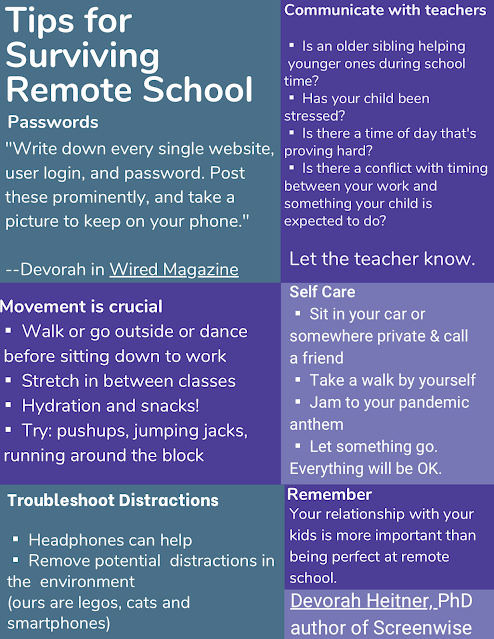
Tips for Surviving Remote School by Devorah Heitner
Here are some really terrific tips I love to share from Devorah Heitner, author of Screenwise. If you haven’t read her book already, I highly recommend it!


November 29, 2019

It's The Great Sale Sporting Event

I obsess when it comes to Black Friday and Cyber Monday sales because I save and research all year long for these days to come! My sister is the hard-core brick and mortar in-store shopper and I'm the caffeine dosing all-nighter online shopper. Both of us treat this time of year like it's a goddamn sporting event!

Well, I thought I'd share my findings here on my blog in hopes that some of you could benefit from it. Sharing is caring :)

It's iPad Stylus Comparison Time!
Did you get in on the Black Friday sale on a new iPad yet?

These newer iPads work with Apple Pencil, but those things are really, really pricey, so I set out to look at alternatives. 🤑

Lots of styluses are on sale now and choice paralysis is setting in. Maybe these considerations could help YOU decide so have a look:

✏️Compared to the Adonit Note, the Crayon can make thick and thin lines because it supports tilt, but I'm still not yet sure if that means you can make shading in sketches happen or not. None of the sub-$50 stylus models seem to support pressure sensitivity, so you'll need to pick and choose from their other features. Reviewers on Amazon for the Adonit Note report a better on/off/connection experience compared to the Adonit Crayon. Both have nibs that wear out over time and need to be replaced, but they are soft on the iPad's glass and don't scratch. I still think it sucks that they don't come with replacement nibs. You'll need to factor in the replacement pricing towards the total cost over ownership.

✏️Then there are the lesser-known (or not really known at all) brands like FoJoJo — which is just fun to say. Styli made by these makers all seem to be knock-offs of each other and it's difficult to tell from the reviews how well these models will hold up over time or if they'll be supported with new firmware down the road when needed. (Hello, FiftyThree Pencil, anyone? :(

✏️The thing that frustrates me about the "carbon fiber" nibs is that I can't seem to determine whether or not they can or will scratch the iPad's glass. The details are sketchy at best. (See what I did there?) In some of the product details they recommend that you put a screen protector on your iPad, but they don't want to admit it's because their nib could potentially scratch the glass like some buyers reported. It says on other product details that the nib is smooth and won't scratch, so which is it?! They all seem to provide replacement nibs, which is handy. but compared to the cost of having to get a screen protector, we're then back to factoring in yet another add-on to the total cost. There is a 5-minute auto-shut off feature which, at first I thought was cool, but then I thought about how frequently I get distracted by interruptions and then I imagined that it would feel like it was constantly losing the connection, so now I'm not so sure if that will be a good feature. One last thing to consider is power button placement. Some look like they would get pressed by accident while others are a tap on the top which might be better.

🛍Either way, these are all great alternatives to the pricier Apple Pencil if you don't need the additional bells and whistles. If you can keep your expectations reasonable for whether or not the money you save is worth the lack of longevity and future support, then one of these might get you creating more with your fancy new iPad!

Here are the three I've been comparing: (The Adonit went on sale again while I was writing this!)
✍️Logotech Crayon:


✍️Adonit Note:


✍️FoJoJo:


Go Clean Your...Mac!
You've heard me brag about how much space I save on my Mac by using Mac Cleaner X, right?
Wait...NO? Sheesh! You're worse than my kids!! Go check out this Sale on the MacPaw Store


(Thank you kindly if you've considered clicking my affiliate links in this post.) 🙏

October 18, 2019

RIP iTunes macOS app

Now that Catalina has been released, I felt it was time to take a moment to note the passing of iTunes. Lots of people hated iTunes. I didn't necessarily hate it for my own personal needs, but I did see and experience the frustration many had with its "bloated" interface. I've always struggled to support it out in the field when working with my clients trying to teach them how to get a handle on their ever-increasing data and media needs. It was a pretty busy app on the Mac so I look forward to the change.

Since the macOS iTunes app is getting chopped up into separate pieces...err...um...apps, I made this spooky graphic for fun to note the change. It's almost Halloween so it's based off a well-known horror flick. If my kids should ever read my blog for fun in the future, I wonder if they'll get this reference.

Yes kids, it was a super cheesy movie and this is a super cheesy post!

RIP iTunes macOS app. We knew you well.