February 21, 2024

Passkeys Presentation for TMUG


My Passkeys presentation for TMUG (Tucson Macintosh Users Group) begins at the 49:12 mark.
This was the first time I gave this presentation. I plan to polish it up and post more about it again later.


References

  1. What is a Passkey? Demo — passkey.org by Yubico
  2. What is a Passkey? Demo —passkeys.io by Hanko
  3. Passage Register — 1Password
  4. Passkeys.directory — 1Password
  5. FIDO Alliance Passkey Directory
  6. Keeper Security supports passkeys for effortless authentication
  7. Make your passkeys and passwords available on all your devices with iPhone and iCloud Keychain — Apple
  8. February 16, 2024 Authenticate 2023: The role of credential managers in the past, present, and future of authentication with Anna Pobletts – FIDO Alliance
  9. February 13, 2024 Passkeys might really kill passwords with Anna Pobletts of 1Password — The Verge
  10. February 8, 2024 I Stopped Using Passwords. It’s Great—and a Total Mess by Matt Burgess – Wired
  11. January 16, 2024 How to save, share, and manage passkeys using 1Password by Nick Summers — 1Password
  12. December 29, 2023 A Passwordless Future Passkeys with Anna Pobletts of 1Password — Syntax
  13. December 20, 2023 Passwords vs. Passkeys - FIDO Bites Back! with Jeff Crume — IBM Technology
  14. November 20, 2023 FIDO Promises a Life Without Passwords with Jeff Crume — IBM Technology
  15. November 4, 2023 Passkeys Email to Friends and Family by Allison Sheridan — Nosillacast
  16. August 22, 2023 About the security of passkeys – Apple
  17. May 24, 2023 Should You Use Passkeys Instead of Passwords? by Amira Dhalla, Yael Grauer — Consumer Reports
  18. May 12, 2023 Passkeys may not be for you, but they are safe and easy—here’s why by Dan Goodin – Ars Technica
  19. December 2, 2022 About Passkey — Know A Little More with Tom Merritt
  20. November 16, 2022 Seven Misunderstandings About Passkeys by Nick Hodges — Passage by 1Password
  21. May 14, 2022 CCATP #728 —Bart Busschots on Why FIDO Passkeys Rock by Bart Busschots — Chit Chat Across the Pond
  22. February 28, 2016 Introduction to the Technical Debt Concept by Declan Whelan, Jean-Louis Letouzey — Agile Alliance
  23. Unlock 1Password with a passkey (beta) — 1Password

February 11, 2024

Mail Mayhem

On episode 412 of Geekiest Show Ever, Melissa tells Elisa the story about how she had to rescue her Mac from the evil Apple Mail app. If your Mail client ever behaves badly, you might want to check this out. You can find our full show notes here. Do you have questions about what you heard in this episode? Please send us your feedback. Follow us on Mastodon for additional tips and conversation. We’d like to hear from you, so let us know which tech topics interest you most. Find Melissa here and find Elisa here or here. Episode art by Melissa Davis.

January 28, 2024

Goonies Never Say Die


On episode 411 of Geekiest Show Ever, Elisa and Melissa discuss tech for getting organized with finances, food, and, genealogy. Check out full show notes here. Do you have questions about what you heard in this episode? Please send us your feedback. Follow us on Mastodon for additional tips and conversation. We’d like to hear from you, so let us know which tech topics interest you most. Find Melissa here and find Elisa here or here. Episode art by Melissa Davis. 

We talked about using Paprika by Hindsight Labs LLC, MacFamilyTree 10 by Synium Software, and Money by Jumsoft.


Paprika app icon MacFamilyTree app icon Money app icon


January 14, 2024

Enlightened

On episode 410 of Geekiest Show Ever Elisa and Melissa discuss how they used tech to entertain over the holidays along with their favorite new flameless candles. Check out full show notes here. Do you have questions about what you heard in this episode? Please send us your feedback. Follow us on Mastodon for additional tips and conversation. We’d like to hear from you, so let us know which tech topics interest you most. Find Melissa here and find Elisa here or here. Episode art by Melissa Davis.


SketchParty TV

Use FaceTime on Apple TV 4K (2nd generation or later)

Auto Tracking Phone Holder

How Screen Time Can Save You When Your iPhone Is Stolen – Lifehacker

3 in 1 Charging Station for Apple Devices 20W Foldable Mag-Safe Charger for Travel Wireless Charger Pad

Eldnacele Flameless Candles Pillar Flickering Dancing Flame Battery Operated LED Candles

Homemory 400+ Hours 6 Pack Flameless LED Votive Candles with Timer

DRomance Flameless Taper Candles with Remote and Timer, 2 Pack Red Moving Wick LED Flickering Taper Candles

Nimiko Flameless Candles with Remote, Battery Operated Flickering Flameless Candles

December 17, 2023

Geekiest Gift Guide

On episode 409 of Geekiest Show Ever Elisa and Melissa share their favorite and most geekiest gift ideas. Check out full show notes here. Do you have questions about what you heard in this episode? Please send us your feedback. Follow us on Mastodon for additional tips and conversation. We’d like to hear from you, so let us know which tech topics interest you most. Find Melissa here and find Elisa here or here. Episode art is a photo by KoolShooters on Pexels.

June 30, 2021

Setting up iPhone for Vintage Users in a Dignified Way

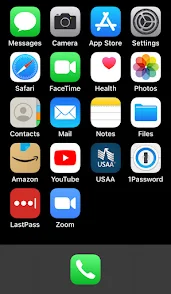
basic iPhone home screen
I was a guest on Allison Sheridan's Chit Chat Across the Pond where we had a great discussion about how to help inexperienced smartphone users of an advanced age group by setting up a new iPhone for them or optimizing the one they already have.

I hope you enjoy listening to the show as much as I did helping to make it. Allison and I could talk for days on this subject and I think you'll be able to tell. :)


Here are the show notes I composed for this episode. It's super long and I've modified it to add some new tips I thought of after the recording, but I hope it can be used as a reference guide for those who might be struggling or need some additional tips when working with their loved ones or assisting a friend in need.

Alternative HTML5 Audio Player

Problem to be Solved: simplifying a complicated device to meet the basic needs of a user with limited touch interface skills while helping to preserve their autonomy in the process.

Recurring things I have observed to be helpful
If it causes more problems than it solves, it’s time to reevaluate.

This is not a complete list and it can take days or even weeks of tweaking, exploring, and experimenting to get someone’s device set up to be the most optimal for their needs, but it’s a good place to start thinking about the most necessary features and settings. Start by doing the initial setup and then make adjustments as the person you're helping gains more confidence and experience. If there is something they don’t like, take time to listen to their needs.

In the beginning it can be really hard for them to ask for help when they don’t know what something is called in order to phrase the question effectively. Aim to reduce whatever is causing friction by asking them what task they’re trying to accomplish. Maybe the text is too small or the screen doesn’t stay lit long enough for them to finish their question, but they weren’t sure how to convey that to you. 

Always check and ask for consent as you go. They might not understand what it is they are consenting to though, so try to explain your intent to help them be more secure with their new device and how the setup is intended to help them use it more easily and securely. Trust is paramount and they’re relying on you to help.

June 9, 2021

WWDC2021 Reactions

On Geekiest Show Ever episode 359, we cherry-pick our favorites from the slew of new software features that were announced at WWDC2021. It was held virtually on Monday, June 7, 2021. (I posted the original show notes here: https://www.geekiestshowever.com/gse359-wwdc2021-reactions/) Do you have questions about what you heard in this episode? Please send us your feedback. You can email us: podcast at geekiestshowever dot com. Follow us on Twitter for additional tips and conversation: https://twitter.com/GeekiestShow. We'd like to hear from you, so let us know which tech topics interest you most. Elisa can be found at https://twitter.com/senseidai/. Episode artwork credit: @DylanMcD8 on twitter Link to episode artwork credit: @DylanMcD8 on twitter

Here are Apple's links to more details about all the features that were announced:

iOS 15

iOS 15 Overview

Full list of new features available with iOS 15


iPadOS

iPad OS Overview

Full list of new features available with iPadOS


macOS Monterey

macOS 12 Overview

Full list of new features available with macOS Monterey


watchOS 8

watchOS 8 Overview

Conversation Boost is a feature I am really excited to try.
Check out this article from ai about it: Apple enhances AirPods with Conversation Boost, Find My integration, Spatial Audio for Apple TV — appleinsider

Check the Apple Security Updates page to see if your Apple gear is up to date.

Audio Link

May 31, 2021

Brett Terpstra on GSE358

On episode 358 of Geekiest Show Ever, we got to nerd out with Brett Terpstra! We talk music, machine setups, coding, apps, user experience, accessibility, super power productivity, ADHD, mental health, and more! I posted the original show notes here.


Brett's Links

https://brettterpstra.com
https://twitter.com/ttscoff
Look for ttscoff everywhere else :)
https://bunchapp.co
https://brettterpstra.com/projects/keybindings/
nvUltra

A Few of Brett's Favorite Mac Tools

BetterTouchTool: https://folivora.ai
Hazel: https://www.noodlesoft.com
CleanShot: https://cleanshot.com
Paletro: https://appmakes.io/paletro
Setapp: https://setapp.com
(affiliate link)