On episode 409 of Geekiest Show Ever Elisa and Melissa share their favorite and most geekiest gift ideas. Check out full show notes here. Do you have questions about what you heard in this episode? Please send us your feedback. Follow us on Mastodon for additional tips and conversation. We’d like to hear from you, so let us know which tech topics interest you most. Find Melissa here and find Elisa here or here. Episode art is a photo by KoolShooters on Pexels.
December 17, 2023
June 30, 2021
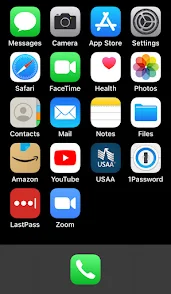
Setting up iPhone for Vintage Users in a Dignified Way
I hope you enjoy listening to the show as much as I did helping to make it. Allison and I could talk for days on this subject and I think you'll be able to tell. :)
Here are the show notes I composed for this episode. It's super long and I've modified it to add some new tips I thought of after the recording, but I hope it can be used as a reference guide for those who might be struggling or need some additional tips when working with their loved ones or assisting a friend in need.
Alternative HTML5 Audio PlayerProblem to be Solved: simplifying a complicated device to meet the basic needs of a user with limited touch interface skills while helping to preserve their autonomy in the process.
Recurring things I have observed to be helpful
If it causes more problems than it solves, it’s time to reevaluate.
This is not a complete list and it can take days or even weeks of tweaking, exploring, and experimenting to get someone’s device set up to be the most optimal for their needs, but it’s a good place to start thinking about the most necessary features and settings. Start by doing the initial setup and then make adjustments as the person you're helping gains more confidence and experience. If there is something they don’t like, take time to listen to their needs.
In the beginning it can be really hard for them to ask for help when they don’t know what something is called in order to phrase the question effectively. Aim to reduce whatever is causing friction by asking them what task they’re trying to accomplish. Maybe the text is too small or the screen doesn’t stay lit long enough for them to finish their question, but they weren’t sure how to convey that to you.
Always check and ask for consent as you go. They might not understand what it is they are consenting to though, so try to explain your intent to help them be more secure with their new device and how the setup is intended to help them use it more easily and securely. Trust is paramount and they’re relying on you to help.
June 9, 2021
WWDC2021 Reactions
![]() |
On Geekiest Show Ever episode 359, we cherry-pick our favorites from the slew of new software features that were announced at WWDC2021. It was held virtually on Monday, June 7, 2021. (I posted the original show notes here: https://www.geekiestshowever.com/gse359-wwdc2021-reactions/) Do you have questions about what you heard in this episode? Please send us your feedback. You can email us: podcast at geekiestshowever dot com. Follow us on Twitter for additional tips and conversation: https://twitter.com/GeekiestShow. We'd like to hear from you, so let us know which tech topics interest you most. Elisa can be found at https://twitter.com/senseidai/. Episode artwork credit: @DylanMcD8 on twitter Link to episode artwork credit: @DylanMcD8 on twitter |
Here are Apple's links to more details about all the features that were announced:
iOS 15
iOS 15 OverviewFull list of new features available with iOS 15
iPadOS
iPad OS OverviewFull list of new features available with iPadOS
macOS Monterey
macOS 12 OverviewFull list of new features available with macOS Monterey
watchOS 8
watchOS 8 OverviewConversation Boost is a feature I am really excited to try.
Check out this article from ai about it: Apple enhances AirPods with Conversation Boost, Find My integration, Spatial Audio for Apple TV — appleinsider
Check the Apple Security Updates page to see if your Apple gear is up to date.
May 31, 2021
Brett Terpstra on GSE358

Brett's Links
https://brettterpstra.com
https://twitter.com/ttscoff
Look for ttscoff everywhere else :)
https://bunchapp.co
https://brettterpstra.com/projects/keybindings/
nvUltra
A Few of Brett's Favorite Mac Tools
BetterTouchTool: https://folivora.ai
Hazel: https://www.noodlesoft.com
CleanShot: https://cleanshot.com
Paletro: https://appmakes.io/paletro
Setapp: https://setapp.com(affiliate link)
May 3, 2021
Knock on Wood
Bob's Links
Bob's Notes
Mac User Groups
- Apple Podcasters and pundits should become members of their local MUGs and volunteer to give presentations a couple times per year.
- This would provide them with more listeners and readers, strengthen the Apple Community, and perhaps add to their advertising base.
Apple CarPlay
- Easy and safe way to be more productive
- Listen to podcasts instead of music (learn stuff)
- Send and receive phone calls and texts
- Bluetooth Apple CarPlay is not needed, wired is better
April 23, 2021
Check Your Cleaning Products
Here are some examples and how you can check your own products online.
Click this link to use the EPA's List N Tool: COVID-19 Disinfectants where you can type in the EPA Registration Number found on the package label of your cleaning product. It will most likely be in tiny print, so have your magnifying lens ready!
https://www.epa.gov/coronavirus/about-list-n-disinfectants-coronavirus-covid-19-0
Link to PDF Infographic
https://www.epa.gov/sites/production/files/2021-04/documents/cleaning-disinfecting-one-pager.pdf