
July 7, 2012
July 6, 2012
Adorable Little App: Little Fox Music Box
FREE App Of The Week in the App Store:
 | Little Fox Music Box – Kids songs – Sing alongShape Minds and Moving Images GmbH Category: Books Updated: Jun 26, 2012 |


This is one of those adorable little apps that makes me say, "Awww!"
My boys and I have been enjoying this interactive app at bedtime. The graphics are beautiful and engaging. Keagan just looooves to tap on the little boar who blows on the fire to make it glow. Lucian loves to tap on all the music makers which make the Little Fox shake a bootie!
July 5, 2012


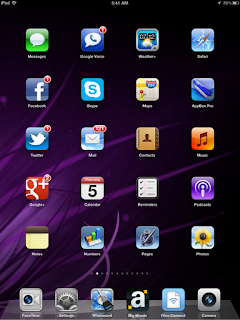
What's On YOUR Home Screen?
There is a new app claiming a spot on the first page of my iPad's home screen and it's the Podcasts app. Don't have it? Get it here:
 | PodcastsApple Category: Entertainment Updated: Jun 26, 2012 |

It's even purple!
I might just have to take up podcasting again over at http://momsgonegeek.net/podcasts
| iTunes for Mac and Windows |

June 28, 2012
No Voice? Use Big Words!
I recently had laryngitis for two weeks. Not only was it painful, but an even bigger challenge during our summer vacation while traveling with my two young sons to visit family and friends with even more children!
This app became invaluable for me during that time. I was able to communicate with people using this on my iPhone and iPad. I had to carefully choose my words when trying to talk to my six year old who is just learning to read, but this was a great exercise.
Big Words is a must-have tool on all your devices!
 | Big Words
DollarApp
Category: Social Networking
Updated: Oct 4, 2011
  |
May 24, 2012
What did you do 1 year ago today?
Timehop: What did you do 1 year ago today?
 Ever thought about time travel? Moms think about this stuff ALL THE TIME. What did I do one year ago? I can't even remember what I did one hour ago. We also think about cloning ourselves so we can get more done and get more sleep too.
Well, since cloning humans hasn't quite caught on yet, how about we just focus on time travel for a moment? Check out this service. It's a fun way to take a peek back into your recent history and reflect. Timehop makes it as easy as checking your email. If you know how to create an email rule or filter, you can just make yourself a folder called Journal, for example, and have your email service automatically deliver messages from Timehop to that folder. Then, when ever you're feeling like you need to reflect on the previous year, just click on that folder and see an archive of your previous posts. If you micro-journal your life in 140 like I do, this can be a useful way to look back and remind yourself of projects you may have left slide. Tweets are archived with links which can come in real handy when you want to revisit a project.
They just added support for archiving your texts from your mobile phone and I'm looking forward to trying that out. Many times I get questions about how to save texts and I think this service may just fit that bill.
Just think of all those kinky little love messages you've sent to your special someone over the course of a year. When you look back on those messages, do you think you'll say to yourself, "Yeah, rock on!" or "Ew. Seriously? So gross."
I think it's an especially great service for scatter-brained moms like me who juggle so many things that a lot can happen in the course of a year. I can read a Timehop message and think, wow, seems like just yesterday when I tweeted about my kiddo's first day of school and awww, look at the snapshot I posted! Cool!

Well, since cloning humans hasn't quite caught on yet, how about we just focus on time travel for a moment? Check out this service. It's a fun way to take a peek back into your recent history and reflect. Timehop makes it as easy as checking your email. If you know how to create an email rule or filter, you can just make yourself a folder called Journal, for example, and have your email service automatically deliver messages from Timehop to that folder. Then, when ever you're feeling like you need to reflect on the previous year, just click on that folder and see an archive of your previous posts. If you micro-journal your life in 140 like I do, this can be a useful way to look back and remind yourself of projects you may have left slide. Tweets are archived with links which can come in real handy when you want to revisit a project.
They just added support for archiving your texts from your mobile phone and I'm looking forward to trying that out. Many times I get questions about how to save texts and I think this service may just fit that bill.
Just think of all those kinky little love messages you've sent to your special someone over the course of a year. When you look back on those messages, do you think you'll say to yourself, "Yeah, rock on!" or "Ew. Seriously? So gross."
I think it's an especially great service for scatter-brained moms like me who juggle so many things that a lot can happen in the course of a year. I can read a Timehop message and think, wow, seems like just yesterday when I tweeted about my kiddo's first day of school and awww, look at the snapshot I posted! Cool!
May 22, 2012
May 20, 2012
Guest on TeacherCast Podcast #19 “Your Friendly Tech Department'
Listen to my guest spot on this podcast with Jeffrey Bradbury of TeacherCast
source link: http://podcast.teachercast.net/teachercast-podcast-19-your-friendly-tech-department/
Topics Covered:
- What is a school technician and why are they important to our school?
- What is the function of the school IT department?
- How many hats does an IT have to wear during the day?
- How is being an IT in the upper grades different than in the lower grades?
- What are some of the duties an IT does during the day?
- Grant Writing for Technology
- Who does the IT really work for?
- How can the IT department influence education?
- How should we support our IT department?
- Should schools be using Mac or PC?
- How can we go paperless in our schools?
- Why is it so difficult for teachers to work with technology when it is always breaking down?
- What are some general things that teachers can do to help out their local IT guy? (or gal!)

Subscribe to:
Posts (Atom)