May 23, 2013

99 Pennies for Your Thoughts?


This young man was diagnosed with bone cancer and died just this past Monday at the age of 18. Before he died, he recorded this song as a way to say goodbye to his family and friends. It's now number 1 on iTunes. If you buy this uplifting (tear-jerking) song, the proceeds go to cancer research.

Shed a tear, spend a buck, then maybe one day cancer won't suck.


Cover Art

Clouds - Single

Zach Sobiech Pop
  •  
  •  
  •  
  •  
  2167 Ratings

May 21, 2013

Go Ahead, Pitch Me

Almost daily I receive emails from marketers and app developers asking me if I'll review or write something about their product or app on my blog. Almost daily I need to turn down these offers. While it is a good problem to have, it's no small challenge trying to keep up with the onslaught of requests (good, bad and downright ugly) in addition to caring for myself, my family and running my own small consulting business! Darn those priorities!


So many times I regret having to turn down opportunities for product and app reviews because despite the work and time they take, I sincerely do enjoy reviewing apps and products. It's only too bad that there just aren't enough hours in the day to fit it all in. Don't tell anyone, but I'm a bit of an appaholic. Ok, so that's not exactly a secret and being a mom with a blog makes me a bit of a target when it comes to marketers looking for free or next-to-nothing advertising. The even sadder truth is that I know I'm not alone. There are so many great content creators out there whose expertise really benefit fledgling companies. There is real gold to be mined out there. Promotion and endorsement is an art that ought not be taken for granted, so you really need to make your requests shine.

That is why I am recommending this book to anyone who has come to my blog or visited my growing social graph hoping to get a review or recommendation from me. I really do want to review your app or product, but please, do your homework and make it your duty to read this book and heed the advice. Make it worth our time — yours, mine, my readers' and your consumers'!

Pitch Perfect: The Art of Promoting Your App on the Webcontains fantastic advice from many of my smart friends on the subject and then some! If you read carefully, you'll even find a thing or two in there from me! (That's my way of disclosing to you that I made some minor contributions to this book.)

This book is available in the iBookstore, on Amazon in both Kindle and paperback as well as from Pearson.

May 14, 2013

Tech Tuesday Hangout No. 5

Today I covered for Benjamin Roethig who normally hosts the Tech Tuesday Hangout live each week. (to be populated soon with video) It was a fun learning experience baptism-by-fire-style on how to host, broadcast, record, edit and publish a Google Hangout! I was joined in discussion by Patrice Brend'amour, Doc Rock and Steve Sande. We talked about a wide range of topics including but not limited to: iOS Game Center leader boards, gaming consoles, apps, Steve's revised book release, Doc's funded Kickstarter project, Patrice and Ben's new website as well along with several other topics that came up. You can even learn how to avoid being eaten by a shark with one simple tip! You don't want to miss it, so watch our discussion unfold and do come back and join us next Tuesday!

Show notes with links are on their way and I'll revise the post once I enter them all.

May 9, 2013

Damn. Even Siri Thinks I Talk Too Much

I can't win.

I asked Siri to:
"text my husband:

'Josh's graduation party is tonight. What time do you think you'll be home because I'd really like to crash for a few hours before we go. Is that a possibility?'

The screenshot above was Siri's response.

She quotes M*A*S*H characters now? How did she know I like M*A*S*H???

Hmmmm. Now I wonder if she can do Cheers?

May 5, 2013

Custom iPad App List for a New iPad Owner

I get frequent requests for app recommendations so I'm starting to make tailored app lists to share with friends and family. Here is an app list for new iPad owners.

May 2, 2013

App Review: Max's Pirate Planet - A Board Game Adventure

This is our family review of the universal iOS app "Max's Pirate Planet - A Board Game Adventure." Whether playing together as a family of 4 or 1 on 1 or as a single player, this game has been fantastic fun for the whole family!

When we have visitors or play dates, this is the game the kids ask me to set up on the Apple TV to play and share with their friends.

We'd like to thank Slant Six Games for the loot, err, um, for gifting this app for a review!

Click here to get this game for your family, available on multiple platforms:

iPhone, iPad or iPod Touch devices, click here:


Android devices, click here:
Get it on Google Play

Kindle Fire devices, click here:

Here is a home movie (10 minute sample) of one of our first game sessions together. As you can see, there was much delight. Even Keagan, our 3-year-old likes to play with assistance. It's nice to play a multi-player game where he doesn't feel left out for a change.


The graphics are beautifully drawn with careful attentions to detail. I love how the characters sail in their ships when crossing water, but get out and walk on dry land. The voice artists are top-notch. Game play is very smooth and not too predictable.

Form Factors
We have played this game on both an iPhone 4S and a 4th-generation iPad on the local screen as well as streamed to our Apple TV. Both form factors worked great. Playing it on the iPad is nice for when there are 2 players whether it's a parent and child or 2 siblings because of what I like to call the "Hand-Held Device Cuddle Factor." Personally, as much as I love to see my boys play physically with each other like little puppies, I also love to watch them cuddle up on the couch with each other to play a game on our iPad. Max's Pirate Planet encourages taking turns and cheering each other on with a healthy dose of friendly competition. This is something my 6- and 3-year-olds really need right now during these formative years.

Playing this game on the iPhone is more comfortable for 4 players passing the device around while viewing it together on the Apple TV. It's kind of like hot potato. When it came time to do a duel on the iPhone I was initially concerned with two fingers swiping on that smaller scree, but it worked surprisingly well I'm sure it had nothing to do with my ability to kick my husband's butt in the sword fighting challenge

Come On, Girls!
If I had one criticism it would only be to add more girl pirate characters from which to choose. As a mom in a house full of boys, I'm the only girl pirate here, Yarr!

Piratey Pirates
Normally, as a parent, I'm a bit squeamish about the idea of "encouraging" pirate culture, but I have to say, this app has done it tastefully in a fun way that doesn't encourage or promote violence. It allows the player to role play pirate-esque adventures in a creative, challenging and safe way. Even Skully the Skeleton manages to skip creeping me out. He's my oldest son's favorite character and he rushes to choose him each time we play. My younger son is in to all things red, so he loves Rusty the fox.

Go Ahead, Duel Me In.
My favorite part is dueling! I especially like sword fighting. I'd like to see other types of duels beyond just the two currently available: sword fighting and cannons. The family and I discussed what types of duels we'd like to see and we were immediately faced with the challenge of trying to avoid something that might promote violent behavior if not carefully planned out. Lucian, our 6 -year-old, suggested a pistol gun fight duel. We as parents couldn't think of a way game developers could avoid becoming mired in the whole gun violence issue we're currently facing as a nation here in the U.S. so we decided that wasn't something we could get behind suggesting as a feature request.

More Monsters, Please!
We all agreed that we'd like to see new monsters to challenge in future app updates. The current monsters are great — so great that we think the app developers will have fun coming up with more monster characters to eat us — uh — I mean — for us to beat for a chance to win treasure!

I really hope you consider either getting this app for your family or gifting it to a friend. It's a real...treasure!

Check out more from Slant Six Games Inc.

April 26, 2013

You're Shipping Me

I Just Shipped My Mom


My kids know how to crack me up and I especially lose it when sleep-deprived.

We get such a giggle from this KMart commercial. They don't understand the double entendre so that makes it just that much more hilarious to me.

Happy [early] Mothers' Day
Enjoy a giggle, it's on us.

April 22, 2013

April 4, 2013

Deep Thoughts From An Angry Insomniac

Ok. I have a question about raising your own chickens. I know people do it to avoid eating eggs with hormones and because commercial farms are disgusting and disrespectful. I agree with that - makes sense to me - IF you want to eat eggs. I do eat eggs because I'm still programmed to want to. I now only by cage-free but even that bugs me because I wonder just what that means exactly and then I think I might not want to know.

Thing is, I'm starting to question: why? There are plenty of plant sources to provide the same health benefits, right? So why do we mess with chickens in the first place?

Isn't it disrespectful to the hens to constantly take their eggs from them to eat them even if you raise them to free roam? Or what if you let her hatch some of the eggs and raise a few chicks, is that much better? Why do we even eat eggs in the first place?

Why don't we convert our animal farming resources to produce more plant crops instead? (yeah - Monsanto - but there has to be a way to drive them out sometime)

Perhaps I play Angry Birds too much! LOL!

Squawk!

I'd like to see an Angry Cows game though, because I'm done with dairy milk, personally. I'm still struggling with cheese, yogurt and ice cream though I'm more conscious about it now and looking for alternatives here and there. I've decided, after having breastfed both my children and having to use a pump to produce for the first few months each time -- and having developed a love hate relationship with that damn pump -- that I can never look at cows being milked the same way ever again. I consciously made an informed choice to strap on an electronic torture device every couple of hours in order to feed my babies because that's what I felt was best. Now, don't get me wrong, I like you, but I don't like you nearly enough to make milk for you full time unless you grew inside my body for 9 months. I don't quite understand why we should expect this from another mammal outside our own species let alone forcibly and cruelly for the purposes of mass production of milk that we have no real right to be drinking anyway. It's quite unnatural, scientifically and the whole process is completely artificial at best. It just seems pointless anymore. (Having been a recipient of WIC (never again!) and seeing the dairy gluttony and subsequent waste - it physically pained me having to dump expired milk down the drain :(  and don't get me started on WIC (nutrition my-ass)

There is scientific proof now that we do not require cow's milk to thrive, but our culture hasn't caught up with that thinking yet and our agriculture supply and demand will likely keep it that way for years to come because many people don't know any other way and it's their livelihood. I get that, but it doesn't mean I need to buy into it.
Don't worry, I don't judge you for drinking milk, eating eggs or other meat as I'm still reviewing my own programming code for efficiency and bugs. I do believe in Karma though, so if you treat dead animal meat as a sport and are wasteful and unkind and an angry boar is headed your way while you're unable to defend yourself, I might just quietly say "oink" instead of "run!"

March 6, 2013

Hand-Made Mac Tip: Wrangle Unruly Previous Recipients


If you're using Apple Mail and are experiencing issues with failed attempts to send out a message because one or more of your friends' email address is borked, then your Previous Recipients may be to blame. Sometimes your Mac needs some general housekeeping.

It's one of those hidden gems in the Mail app that not many know about. Ok, so perhaps it's not much of a gem, but it is supposed to make life easier for you when it comes to composing and sending mail messages. You see, every time you send a mail message, the recipients — people you send the message To or CC or BCC — get saved into this handy-dandy section called the Previous Recipients window. The next time you go to email someone, you can just start typing a few letters of the person's name or email and the Previous Recipients List will serve up a history of all email addresses that match those letters regardless of if it's been stored in your Contacts (Address Book for those still on legacy systems). Unfortunately though, this same "feature" will also serve up any of the incorrect email addresses as well which in many cases, tired eyes may not catch and then all the fun starts. [sarcasm]

These email addresses congregate there like dustbunnies in heat and periodically just need to be swept up and sent away to never never land.


Like my 3-year old now says,
"But, WHY Mommy?"

Because I said so.

Actually, because, if you're having problems sending messages — and I've seen this too many times to count — (which is why I've decided to make it a Hand-Made Mac Tip) it's usually because you have several wrongly entered email addresses hiding in this list somewhere and it's just a matter of time before one of them bites you back.

How does this happen?

Two words: fat fingers.

Ok, one more word: cats.

It happens whenever you (or your cat) accidentally type an email address wrongly despite being absolutely certain that their email address was someoneawesome@theiremailaddress.con

or, how about: someoneawesome@gmal.com

Can you spot the mistakes? Does your cat care? If you answered no to either of those questions, then you've got issues.

Well, guess what. Mail servers can spot the difference but for some dumb reason, Mail collects and stores these boo boos in your Previous Recipients list despite this fact.

Here's how to clean it out and start fresh.

In Mail, select Previous Recipients from the Window menu. In the next window, select all of the addresses in this list and then click the Remove From List button. (Just do it, don't hesitate, be ruthless! Zap them all!)

Now this list will repopulate over time (rinse and repeat), but any badly entered email addresses will no longer cause problems with outgoing messages.


I hope this was helpful and that you feel all sparkly fresh now!

March 5, 2013

I Don't Suppose Zombies Recycle

I have the kind of six-year-old kid that can handle some deep kinds of adult discussions.

Or so I thought.

I don't know why, but last week during our date night, I mentioned seeing this cool urn idea where you can recycle your ashes and have a tree planted. I think we were discussing recycling. I told him that when people die, they don't need their bodies anymore, so why not grow into trees?


He paused and blinked for a bit and then I felt nervous thinking, crap, what have I just done to my six-year-old?!

He had this puzzled look on his face so I sheepishly said, "Well, what do you think about that."

He turned his head to the side looking completely perplexed and said, "So people just need their heads and their legs when they die?"

Meanwhile, Lucian continues to freeze off some major zombie butt in the app Plants vs Zombies. So much for a discussion on reincarnation.
(I tried to convince him to take his pink medicine for the ear infection by pretending it was a light saber that would defeat the germs.)

February 19, 2013

How Do I Watch Thee? Let Me Count The Ways

I just watched the last episode of Downton Abbey. sniff sniff. I need a hug now. damn show!!

I won't spoil it, don't worry.

Here is something cool though, in my opinion: I watched the first season through Netflix on my Apple TV. Season 2, I watched on my iPad in the Amazon Instant Video app. Season 3, I began watching on good ol fashioned over-the-air TV via PBS which is piped in from a big old mother of an antennae on our roof.

When my husband saw how devoted I was to watch it "straight from the tap" -as in- without a bathroom or ice cream break while watching it at its original air date and time, he became intrigued and started watching it too.

With my husband now hooked on it, I started watching it all a second time from Season 1 in Netflix. Then, since I no longer have an Amazon Prime membership, we were watching Season 2 on Hulu Plus on the Apple TV. Because of that I started to fall behind on Season 3 waiting for Hubby to catch up.

I just watched the last 3 episodes using the PBS iPad app with in-app AirPlay streamed to my Apple TV. The picture quality was wonderful with no lag and I could just set my iPad aside and lock the screen while it streamed the show - commercial free - with the ability to pause when Keagan came in the room (earlier than his usual clockwork 3:00 am)

All this tech to watch a show in which the story is set in the 20th Century just as automobiles, rotary telephones and electricity were becoming standard.

Oh the irony!

In the words of Sh!t The Dowager Countess says, "Now I've seen everything!"

February 5, 2013

PSA: Facebooking Your Parents

Is your mom or dad on Facebook? Perhaps you should consider the following before following:

From OnlineEducation.net Parents Facebooking Infographic Original Link: http://www.onlineeducation.net/2013/01/21/facebooking-your-parents

January 30, 2013

Psycho Killer Qu'est-ce que c'est - fa fa fa far better

Watch Bloodline, Wired's Video Series on the Taxonomy of Fear in Horror Movies


I just watched all of the episodes for this video podcast on my Apple TV and I really enjoyed it. I love the short format, organization and attention to detail. Jay Dayrit  and Jordan Crucchiola are pleasant hosts who get their point across in an easy-to-swallow-pill. I really appreciate the psychological thought process in which they engage. It's both humorous, witty and educational. Who doesn't need a dose of life-saving advice like using a broken arm to unlock a fence when you're trapped and fear certain demise?

I really enjoy their wardrobe. Each time I wonder what will come next. On the most recent episode, whether planned or not, I really appreciated Jordan's brown Dexter Kill Shirt. Something about Jay really reminds me of Breaking Bad's Gus Fring! I'll just die laughing if you bring a bucket of chicken to an episode, Jay!

I think you should keep rolling with the wardrobe "easter eggs" as I see them :)
Keep up the good work and remember, it's just a podcast.

January 29, 2013

Adorable Little App: Check out Endless Alphabet

This is a new favorite of ours here at TheMacMommy headquarters,
(a.k.a, home and sick in bed recovering from the flu). This is a really fun app to entertain
the kiddos up on the Apple TV when beamed from your iPad or iPhone.
Let me know if you too giggle at the letter 'D' and how it says "duh duh duh duh."


Cover Art

Endless Alphabet


1123 Ratings

December 30, 2012

Hand Made iPad Tip: Label - Case - BubCap

Got a new iPad? Protect it from getting scuffed and maybe even lost. In this Hand-Made iPad Tip, I discuss labeling your iPad using clear labeling tape, securing your home button with a BubCap and making your iPad more functional and protected.

HatTip: +Knight Wise of KnightWise.com for recommending the rooCASE. I love it! 
Product Links:

  A note about BubCap: yes, you can go into Settings and enable Guided Access, but a BubCap is still faster!

December 26, 2012

Find My Santa

Christmas Eve 2012 - Lucian and Mommy are checking in on Santa's GPS location using the Google Earth app on our iPad.

Doodle-Track Car Set

The boys got a Doodle-Track Car Set for Christmas. Here it is in action. I had a great time with it. I experimented with different lines and thicknesses and then I tried some patterns to see what it could do. It's a fun toy.

I haven't yet, but want to try it with a regular sharpie marker. So far it has worked fine on the blank side of wrapping paper. Below is an affiliate link where you can buy it from Amazon.


December 23, 2012

Make A List and Tap It Twice

  ...gonna find out who's naughty or nice...

Need a last minute gift for a friend or relative who is also a parent to small children?

Here's an idea just in time for the holiday to help show children the importance of being good for goodness sake (and also for a cookie or extended game time with their new toys after Christmas Day!)

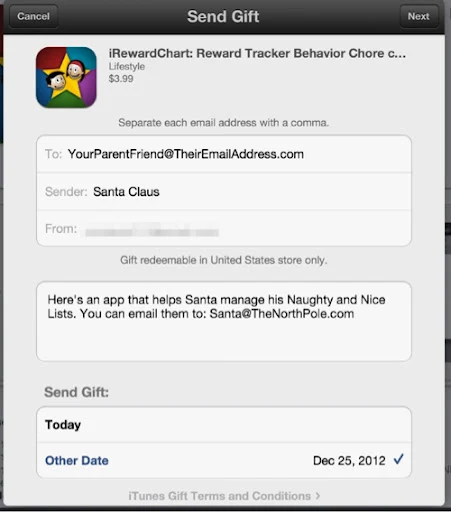
You can gift an app from the iOS App Store!
(I've been known to 'speak for the treeeees!')

Go to this link in the App Store or type "ireward chart" into the search box.
,
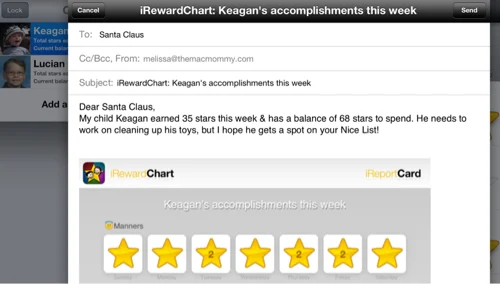
Then, after you've logged some good deeds, you can have your child email their iReportCard to Santa directly from within the Share feature of the app. Even Grandma on Facebook can see when they have earned a reward.

My kids love the sounds the stars make. Keagan calls them "good stars" (since he doesn't yet say 'gold' quite right)
When they hear a "red star" sound, it really gets their attention!

Ah Pavlov would be so proud!


December 21, 2012

iBank year-end price promotion: 20% off thru Dec. 31

SOLSTICE SALE! SAVE $12 OFF IBANK FOR MAC DURING THE LAST 12 DAYS OF 2012
All iBank Apps Also 20% Off at the App Stores


(PUTNEY, VT) — Whether you celebrate the Solstice or Festivus, Christmas or Kwanzaa, IGG Software is spreading good cheer this holiday season is by announcing 20% savings on iBank 4 for Mac and iBank for iPad. Year-end sale prices on these market-leading personal finance apps are available at the IGG website and at Apple's App Stores, from December 20 through 31.

"We're focused on delivering the best finance applications for the Mac and iOS," says IGG marketing director Scott Marc Becker, "because they give people more control over their lives. Offering great tools at a special price is one more way for us to help folks organize their records for 2012 and manage their hard-earned money even better in the new year."

During the final 12 days of 2012 (December 20 - 31), new online purchases of iBank 4 made at the IGG web store or at the Mac App Store will be just $47.99 — $12.00 in instant savings off the regular price. iBank for iPad, available exclusively for iOS at the App Store, will also be discounted 20% during that period, to a sale price of $11.99.

— iBank 4 is the leading alternative to Quicken for personal finance management on the Mac. Full-featured and fully compatible with OS X 10.8 Mountain Lion, iBank 4 has been a top-selling and top-grossing finance app at the Mac App Store since the store's inception nearly two years ago. 

Among the many features of iBank 4 are:

• fast transaction entry and dynamic editing options in an intuitive, innovative two-line register
• easy, instant reports
• powerful investment tracking
• enhanced envelope budgeting
• a seamless set-up assistant for transferring data from Mac and PC versions of Quicken, MS Money, or other finance programs
• direct downloads from online accounts
• custom check printing
• robust data export
• iPhone or iPad sync
• 30-day free trial downloads
• unlimited free support (including Live Chat) 
• a 90-day guarantee on direct purchases from the IGG web store. 

iBank updates appear often; the current version is iBank 4.6.1. The regular retail price of iBank 4 is $59.99; licensed users of iBank 3 can upgrade for $29.99. iBank 4 requires Mac OS X 10.6 or higher, and will run on Macs using either Intel or PowerPC processors. The latest version can be downloaded at http://www.iggsoftware.com/ibank, where there is also access to a library of iBank 4 video tutorials and an in-depth user manual.

— iBank for iPad, introduced six months ago, remains the top-grossing finance app on the App Store as well. iBank for iPad delivers the most powerful set of money management features available in an iOS app, including budgets, investment tracking, transaction editing and automatic account updates from thousands of banks via the app's Direct Access subscription service. Alternately, data in the app can be updated by syncing with a desktop copy of iBank 4. The regular price of iBank for iPad is $14.99.

— iBank Mobile for iPhone and iPod touch is also 20% off (on sale at $3.99) during this promotion. Users can enter transactions on the go, check account balances, and sync wirelessly with data stored on iBank for Mac, via local Wi-Fi or custom webDAV servers. Regular App Store price is $4.99.

2013 marks the 10th anniversary of IGG Software, Inc., founded in 2003 by developer Ian Gillespie. IGG offers intuitive, elegant and powerful applications for individuals and small businesses. Based in Putney, Vermont, its flagship products are iBank, for personal finance management, and iBiz, for time-tracking and billing. For further information, review licenses, or to schedule interviews with Ian Gillespie or Chief Architect James Gillespie, please contact IGG Marketing Director Scott Marc Becker: scott@iggsoftware.com.

December 10, 2012

The MacJury Has Spoken: Holiday Gift Ideas from The MacJury

I was a MacJuror last week. Watch to see what stocking stuffers my friends and I recommend for the geek in your life this Holiday Season!

View The MacJury post

November 30, 2012

Simplicity

Simple joys. Children are a reminder of how to live when you forget.

November 29, 2012

Painting on My iPad

Made with Paper

Just havin some fun.
What are you creating with YOUR tablet? Please share. I'd love to see it.

📲

Insomnia


September 20, 2012

iBank Puts the 'I' in Banking

If you're not already using iBank, I encourage you to check out this great financial management tool! I've looked at several different solutions, including the highly acclaimed Quicken for Windows on a Mac. It goes without saying, I enjoy using my Mac without Windows and I don't feel I should have to compromise on that just because I want financial management software with a slick user interface and elegant reporting features. If you're a Mac user, you simply don't need to compromise with iBank.

Feature set is important if not the most important consideration when reviewing software. iBank has it covered. I can't tell you how much I appreciate the attention to detail they put into every pixel of their apps. Ever since the developer gave me a review license, I still have yet to explore all it has to offer!

You had me at color.

Here is just one of my favorite features: customized and color-coded transaction categories! Money may be green, but maybe I feel just a little bit better when my mortgage payment transactions are a pleasing shade of cantaloup!

It's the little things like adding color to your categories that can really add to the already incredible reporting features the Mac application offers. A CPA would be happy to have you for a client using this software. (So I've been told.)

Another important factor for me in selecting a personal financial management tool — or most any other software tool for that matter — is how well its supported. IGG Software is constantly updating iBank and making improvements. They don't leave you feeling abandoned like other product developers who take years in between to release half-baked updates. They pay attention to their customers and offer a community of support.

Case in point, they've released yet another update to their already great iBank application for the Mac. (I like to think of it as "polish.") Here is one of their many press releases for your immediate review:
September 19, 2012
FOR IMMEDIATE RELEASE

 IBANK 4.6 DELIVERS NEW AND IMPROVED FEATURES FOR BETTER BUDGETINGMajor Update Offers Superior Tools For Tracking Expenses And Saving Money  
(PUTNEY, VT) — IGG Software today announced the release iBank 4.6, the market-leading personal finance application for Mac. This new version of iBank delivers a brand new set of tools for managing budgets, support for Retina Display Macs, and many other fixes and enhancements.  

“This is the update many of iBank’s users were asking for,” says IGG president Ian Gillespie. “With so much economic uncertainty, families especially want to see where their money is going, and these new tools provide better insight into spending habits, ways to save, and day-to-day financial management. For a lot of people, this is the value proposition in iBank.”
iBank 4.6’s budgeting enhancements include the following: 

  • Budget vs. Actual report view. Among the most popular feature requests for iBank 4, this new report view gives users a fast, easy way to visualize and compare their budgets with actual spending totals. The report view can be customized for specific time periods, and users can drill down by category to see transactions that make up their expenditures. 
  • Improved budget view. Now users have the ability to view and compare different periods (from the past, or future projections) in the main budget view window, to better see at a glance how spending has changed over time or how closely they are following their own budget goals.
  • Faster performance and more. Besides significant speed improvements within budget functions, users can now edit the accounts used for a given budget, among other changes. Related fixes include correct updating to Actual Income and Actual Expense totals after changes to period or category.
iBank 4.6 also adds support for Apple’s new Retina Display. Rounding out the update are additional fixes and improvements to performance, exports, bank downloads, reports, Smart Accounts and more. iBank 4.6 is free to current users of iBank 4, and is available immediately via the IGG website. It has been submitted to the Mac App Store for approval. 
IGG offers unlimited 30-day free trial downloads of iBank, free support (including Live Chat) and a 90-day unconditional guarantee on direct purchases from the IGG web store. The regular retail price of iBank 4 is $59.99; licensed users of iBank 3 can upgrade for $29.99. iBank 4.6 requires Mac OS X 10.6 or higher. The latest version can be downloaded at http://www.iggsoftware.com/ibank, where there is also access to a library of iBank 4 video tutorials. 
IGG Software, Inc., was founded in 2003 by developer Ian Gillespie to offer intuitive, elegant and powerful applications for individuals and small businesses. Based in Putney, Vermont, its flagship products are iBank, for personal finance management, and iBiz, for time-tracking and billing. For further information, review licenses, or to schedule interviews with Ian Gillespie or CTO James Gillespie, please contact IGG Marketing Director Scott Marc Becker: scott@iggsoftware.com.

Does Your Mac Have Companions?

Mine does. So does my Husband's Mac. (as does our children's Mac!) We have a whole family of gadgets that like to play together and guess what, they have apps for them too!
"iBank Mobile is an essential app for iOS devices that lets you keep track of your day-to-day spending and account balances on the go. The best iPhone finance app now includes search, multi-tasking, Retina Display support, data export and more new features! iBank for Mac users can sync transactions, accounts and categories automatically and seamlessly - via Wi-Fi (Bonjour) or any WebDAV server - for perfect personal finance management." — [source http://www.iggsoftware.com/ibankmobile/index.php]
Managing family finances can be a daunting task and cause stress. Install and synchronize your iBank data on multiple devices with iBank Mobile and iBank for iPad and now each able and willing family member can contribute some order to the chaos of mounding transactions. (Ok, but it sounds good, right?)
"Honey, what was the name of that restaurant we went to last month? Want to have dinner there again?" 
"I can't remember, let me check my iBank Mobile app and look at last month's dining out transactions. Oh, here it is, yes, the price of that meal was fairly reasonable and we have a coupon in our Passbook." (coming soon to an iPhone near you!)
There are times when you don't want to be tethered to your desktop or really want a smaller form factor than a laptop but more features than an iPhone app. That's where iBank for iPad comes in. Just take a look at the gorgeous interface it offers. They even provide an interactive tutorial. That's a class act.

In conclusion, IGG Software, Inc. has created a suite of products for the consumer and small business that puts you in charge of managing your finances with helpful tools that are secure, easy to use and even easier on the eyes. The apps run on all of your devices while the most personal of information is not shared with advertisers like some of the web-based apps on the market. You control how your own information is used and there are incredibly flexible reporting features built in. The developers support and promote their product with great enthusiasm and attention to detail.

If you don't believe me, just ask this kitten.


August 30, 2012

Mamma Likes Kickstarter: Mobi-Lens

I can not wait to get my hands on one of these adorable little gadgets! (I really want one in purple. #hint #hint)

Picture This

You know how hard it is to get little kids to look into the camera on your smartphone? Well, take a look at this prototype and imagine how much more fun it would be to snap those precious moments using a Mobi-Lens clipped to your mobile device whether it's an iPhone, iPad or even your laptop.

Photo Booth just got that much more fun with a Mobi-Lens clipped to your MacBook Pro!

Pledge to Make It Happen


They plan on making these in different colors. Imagine them with some kind of bling, logo, school mascot or favorite Sesame Street character! Getting your little ones to look at your smartphone just might be a little bit less frustrating if you give them a fun focal point while you snapshot that precious memory.

Capture adorable little details up close with the macro lens. Dimples, drool or a wiggly first tooth. Kids will undoubtedly have fun with the fisheye lens. Remember Grover? Near! Far! Near! Far! Go long and go wide at soccer games and get that goal with the wide angle lens.


Source: kickstarter.com via Melissa on Pinterest

https://www.facebook.com/MobiLens